Reviews
Word Puzzle Learning Game turns vocabulary building into an engaging puzzle experience. The color-coded feedback system is intuitive, and the smart hints with definitions and examples make learning easy. With CEFR levels from A1 to C2, it suits all ages and skill levels. The points system adds motivation, and the browser-based play works on any device. A great choice for families and learners.
About this game
Game Introduction
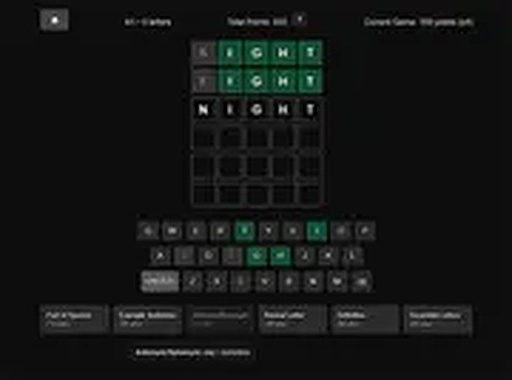
Word Puzzle Learning Game is an educational word puzzle designed to help players expand their vocabulary in an enjoyable way. The core objective is to guess a hidden word within six attempts. Players select a CEFR level from A1 to C2 and a word length, then type their guesses. Each guess provides color-coded feedback: green means the letter is in the correct position, yellow shows the letter is in the word but in the wrong spot, and gray indicates the letter is not in the word. What makes this game unique is its focus on learning through smart hints that include definitions, example sentences, synonyms, and antonyms. This approach turns each puzzle into a mini-lesson, helping players understand word meanings and usage. The game runs in a browser on both mobile and desktop devices, making it accessible anywhere. Content is family-friendly and safe for all ages, focusing on learning and fun without any inappropriate material.
How to Play
To play, start by choosing your CEFR level and word length. Use your keyboard or the on-screen keys to type a word. Press enter to submit your guess. The letters change color to show your progress: green means the letter is in the right spot, yellow means it is in the word but the wrong spot, and gray means it is not in the word. You have six tries to guess the correct word. Earn points as you play, which you can spend on hints if you get stuck. The goal is to learn new words and have fun.
Game Features
Smart hints provide definitions, example sentences, synonyms, and antonyms. The game offers CEFR levels from A1 to C2 for targeted learning. A points system allows players to unlock hints. The interface works on mobile and desktop devices. The content is safe for all ages and family-friendly.
Tips for Success
Start with a common five-letter word to get initial feedback. Pay attention to letter colors to narrow down possibilities. Use hints when stuck, but try to solve without them to build vocabulary. Practice regularly with different CEFR levels to expand your word knowledge. Focus on learning the meanings of new words rather than just guessing.
Compatibility
✅ Works on PC & Mobile | Recommended: Chrome / Safari / Edge
 SnakeRobot Hub