
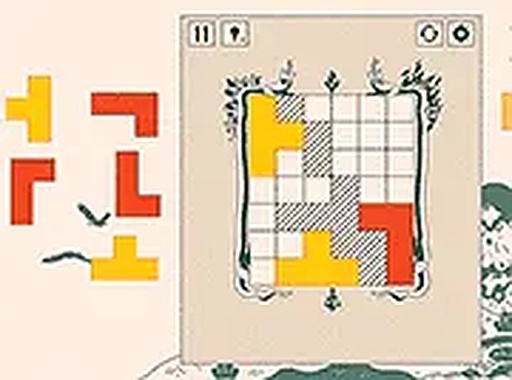
Ludoteca Block Puzzle
Ludoteca Block Puzzle is a free online logic puzzle game where you arrange blocks on a board according to rules. With 60 levels and no downloads, it offers a satisfying mental workout.
Reviews
About this game
Game Introduction
Ludoteca Block Puzzle is a free online logic puzzle game that challenges players to arrange blocks on a board according to a set of rules. The game presents a board and a rule panel on the right side of the screen. Your objective is to drag blocks from a selection and place them so that the arrangement matches the rule. For example, blocks of certain colors or shapes may need to be grouped together or separated. The game includes 60 levels, each introducing new rules to keep the experience fresh. It starts with simple puzzles to help you learn the basics and gradually becomes more complex. You can rotate blocks using right-click, the 'r' key, or the space bar while dragging. This game runs in any modern browser without downloads, making it accessible on both desktop and mobile devices. It offers a satisfying mental workout that improves problem-solving skills.
How to Play
To play Ludoteca Block Puzzle, first look at the rule displayed on the right side of the screen. This rule tells you how blocks must be arranged on the board. For instance, you might need to place blocks so that certain colors or shapes are together or apart. Drag any block from the available set onto the board. If you need to rotate a block, use right-click, press the 'r' key, or hold the space bar while dragging. Release the block to drop it into position. If your placement does not match the rule, you can undo or restart the level. Each level has a unique solution, so take your time to think through each move. The game provides a smooth learning curve, allowing you to master basic rules before tackling more complex ones.
Game Features
Ludoteca Block Puzzle includes 60 levels that introduce new rules as you advance. Block rotation is supported via right-click, 'r' key, or space bar. The game is mobile friendly and works in any modern browser without downloads. It is completely free to play with no in-app purchases or ads that disrupt gameplay. The clean interface and intuitive controls make it easy for players of all ages to pick up and enjoy.
Tips for Success
To succeed in Ludoteca Block Puzzle, take time to understand each rule before placing blocks. Experiment with different rotations and positions to find the correct arrangement. If you get stuck, try undoing moves or restarting the level to approach the puzzle with fresh eyes. Practice regularly to improve your logical thinking and pattern recognition. Remember that each level has a unique solution, so patience and careful observation are key.



Comments
0 comments