Game Introduction
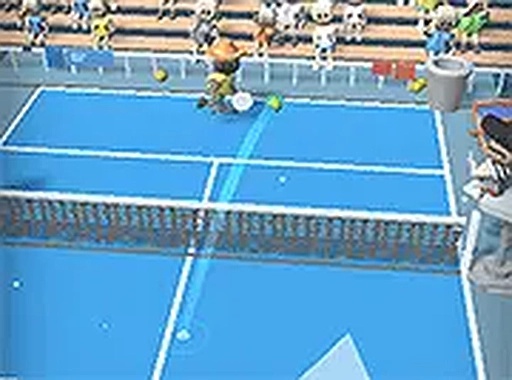
Tennis Club Arcade Sports is a casual sports title that brings the excitement of tennis to your screen in a simplified, accessible format. As an arcade-style tennis game, it focuses on fast-paced rallies and straightforward controls rather than complex simulations. The core objective is to outplay your opponent by hitting the ball past them, earning points and progressing through matches. This game is designed for quick sessions, making it ideal for players who want a light, engaging challenge without a steep learning curve. Its clean, 3D visuals and smooth animations help create an immersive experience that stays true to the spirit of tennis while keeping things fun and uncomplicated.
How to Play
Players typically control a tennis player on a 3D court, using keyboard or mouse inputs to move, swing, and aim their shots. The game likely begins with a practice mode where you can learn the basic controls and timing for different types of shots, such as forehands, backhands, and serves. Once comfortable, you can enter tournament mode to face AI opponents or, in some versions, other players online. Each match follows standard tennis scoring: you must win points by hitting the ball into your opponent's court in a way they cannot return. Positioning and shot placement are key to gaining an advantage. Winning matches earns rewards that can be used to unlock new characters or other content.
Game Features
Tennis Club Arcade Sports includes smooth 3D graphics that run well on most computers, providing a visually appealing tennis experience. The game offers a variety of unlockable characters, each with a unique appearance, adding a layer of personalization and progression. A tournament mode is available, featuring a series of matches with increasing difficulty, giving players clear goals to work toward. The casual pick-up-and-play design means no long tutorials or complicated menus, allowing you to jump into a match quickly. A practice mode is also included, enabling you to refine your skills without the pressure of competition. These features combine to create a replayable sports game that respects your time.
Tips for Success
To excel in Tennis Club Arcade Sports, start by spending time in practice mode to master the timing of your swings and the movement of your player. Focus on positioning yourself early to set up strong shots rather than reacting late. Learn to vary your shot placement—hitting to different corners of the court can keep your opponent off balance. Pay attention to your opponent's positioning and try to aim for open spaces. In tournaments, stay calm and patient; forcing difficult shots often leads to errors. Finally, take advantage of the reward system by playing consistently to unlock new characters, which can keep the experience fresh and motivating.
Compatibility
✅ This game supports:
- Desktop browsers (Chrome, Edge, Safari)
- Mobile browsers (Chrome on Android, Safari on iOS)
❌ Does NOT support: - Internet Explorer - Very old browser versions
👉 Try refreshing or updating your browser
 SnakeRobot Hub