Reviews
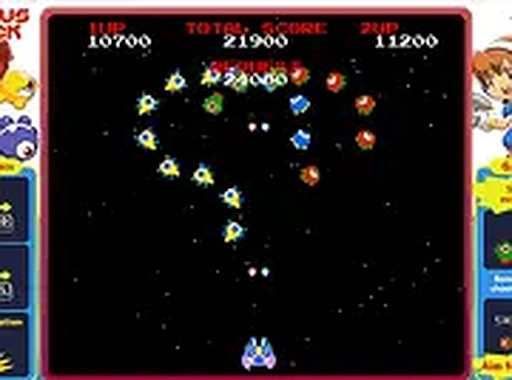
Cosmic Octopus Chase Arcade delivers classic arcade fun with a colorful space theme. The controls are easy to learn, making it accessible for all ages. The local two-player mode adds cooperative excitement, and the bonus points for clearing waves keep the challenge fresh. It's a free, no-download game that runs smoothly on desktop browsers.
About this game
Game Introduction
Cosmic Octopus Chase Arcade is a retro-style space shooter set in a vibrant cosmic arena. Players control a spaceship and aim to defeat waves of octopus swarms to earn points. The game offers a simple yet engaging loop, making it suitable for quick play sessions or longer gaming periods. Bonus points are awarded for clearing an entire wave of octopuses, adding an extra layer of challenge. The game can be played solo to beat personal high scores or with a friend in local cooperative mode. It is free to play directly in a browser and runs smoothly on desktop computers. For the best experience, players may use a keyboard or mouse to control their ship. Full screen mode provides a more immersive view of the action.
How to Play
To play Cosmic Octopus Chase Arcade, use a keyboard or mouse to control the spaceship. Players aim at the octopus swarms and press the fire button to defeat them. Each octopus defeated adds to the score. For bonus points, try to clear all octopuses in a wave. The game supports both solo and two-player modes, so a friend can join the action. New waves of octopuses appear and may become more challenging over time. The controls are intuitive, making it easy for players of all skill levels to start playing. Using full screen mode can improve the view. Practicing aim and reflexes helps achieve higher scores.
Game Features
Game features include: fun arcade shooter action; solo or local multiplayer modes; bonus points for clearing all octopuses; full screen mode for an immersive view; and free browser-based play with no downloads needed. The game is designed for quick sessions or extended play, with each wave presenting a new challenge.
Tips for Success
Practice regularly to improve aim and reflexes. Learn the movement patterns of the octopus swarms to anticipate their paths. Focus on clearing entire waves to earn bonus points. Playing with a friend can make the experience more enjoyable and help coordinate attacks. Use full screen mode for a better view of the arena.
Compatibility
▸ Desktop: Chrome / Edge / Firefox / Safari
▸ Mobile: iOS Safari / Android Chrome
▸ Tablet: iPadOS Safari / Android Tablet Browser
Keep your browser updated for the best experience
 SnakeRobot Hub